Showing posts with label Linux. Show all posts

Saturday, May 26, 2018

Raspberry PI PIXEL on old laptop

Installed the raspberry PI os PIXEL on an old laptop

https://www.raspberrypi.org/blog/pixel-pc-mac/

laptop:

old acer aspire one:

  • atom N570 cpu, 4 core 1.66GHz
  • intel graphics
  • 1 G ram
  • 250 MB HD
  • 1000x600 screen
  • wifi


almost the same specs as a Raspberry PI 3!

initially works fine, except BATTERY DIES, even when lid closed!

solution:
install the laptop components of debian to manage power properly:

sudo apt install laptop-mode-tools

then run the control utility (as root)

sudo /usr/sbin/lmt-config-gui

so far working well ...


Friday, September 12, 2014

kivy : fedora 20 netbook graphics update required

Installing Kivy for some python development/fun with Android and my old netbook;


remember, the netbook is an old
Acer Aspire one D257 , with 1 gig ram and Intel(R) Atom(TM) CPU N570

I think the netbook is less powerful than most high end Android phones these days!


I found there is a repo that is slightly newer than the online doc (which lists Fedora_18)


Kivy Launcher works great on android, but the netbook, recently updated to Fedora 20 gave the error:

Fatal Python error: (pygame parachute) Segmentation Fault

oh no!

but this is not uncommon, since is listed early in the FAQ for kivy.

but then no details on how to update Fedora!

that took a bit of looking around;  I am running the non standard LXDE spin; so did not have all tools installed;

finally found the link to the Intel graphics driver site:


installed the drivers using the graphical installer for 1.0.6 for 32bit,  rebooted, and now am running.

now can type on netbook and use editors and then send the result to the android device to test!


p.s.
my other machine, running Fedora 20 64 bit 8 gig ram, AMD graphics, did not require any updates, it runs fine out of box.


Tuesday, October 9, 2012

Adafruit's WebIDE on latest Raspbian

trying out Adafruit's web ide

initial notes, quick in no particular order...

1) for me did not install via script;
there were some failed dependencies;
(my network may not be the fastest, so likely some time outs)

so the system was not installed.  reran the install script a few times, and it failed at different points.

finally just ran the partially installed startup script as if I had installed manually from git and noted which packages failed to load/install, and installed them manually via sudo npm .

2) version I installed is hardcoded for user pi;  initially tried with a different userid, and system scripts were coded for pi;
-could fix this, but for initial tests, have switched over to pi user.

3) success;
first project running "hello world" and loops!  Very cool.

4) npm is new for me:
lots of "magic" of nodejs ... I'm new to npm and node.js .  IDE does not use python, to teach python?  I was expecting something like idle (icon is on raspbian default desktop)

5) may try c for next set of tests.

6) interesting, IDE is setup for bitbucket, not github?
(I see the ide itself on github)
-could fix this in the code, but leaving with defaults for now.
(I have a github account, created a new account for bitbucket)

Wednesday, September 19, 2012

New Raspbian running

new raspbian image running. Detected wireless out of box. Found driver is loaded from "staging" area, so hope it will eventually get promoted.

trying turbo mode.

penguinspuzzle does still lock up occasionally.

One slight oddity:
wireless keyboard does not startup all the time.
unplugging wireless usb radio dongle, and plugging back in re-enables.

Tuesday, September 18, 2012

Fedora on Raspberry Pi, fedoraspberry? pi-dora?

Tried out one of the Fedora 17 images
I use Fedora on my netbook, so it was familiar

Notes:
The video settings are different than raspbian. Noticed due to running on a SD TV
Pygame was not installed by default, but a quick
 yum install 
enabled it, and could run wormy.

Thursday, September 13, 2012

Fedora 17 + acer aspire one SD Card reader fix

my netbook : Acer Aspire One D257-1814

did not recognize the SD card reader with the default Fedora 17 build. Googled and found that a missing "staging" module was required:
having previously installed rpmfusion:

yum install kmod-staging
modprobe keucr

(did reboot)

now inserting my SD card brings up the file dialog!

necessary to rebuild raspberry pi images.

Update: 2014
Fedora 20 "just works"
out of box.
no new mods required.

Wednesday, September 12, 2012

Raspbmc and MythTV, via WiFi, no extra codec

MythTV videos playing on the Raspberry Pi

notes:
MythTV setup on Fedora creates files that do not play on a default setup; but if they have been transcoded, they play.
All defaults, did not change MythTV settings.
TV card:Hauppauge WinTV-PVR-USB2 MPEG2 Encoder/Tuner

Monday, September 10, 2012

Colossal Cave on Raspberry PI

Putting some old text games on the Raspberry PI This is a very old one I played : Colossal Cave Adventure
part of the bsdgames package.

apt-get install bsdgames

Friday, September 7, 2012

US keyboard, case and WiFi on Raspberry PI

There is our 1.0 case. The chef's hat seemed to fit the theme: The SD Card is like a cookie tray, says my son.
logged into the raspbian image, using a US keyboard. Originally accepted all defaults settings, including the UK keyboard; My daughter trying to type some python scripts noticed the discrepancy...
ran the command
sudo dpkg-reconfigure keyboard-configuration
to reset keyboard.

WiFi
using the Debian instructions for command line have connected an ASUSTek Computer, Inc. USB-N10 802.11n Network Adapter [Realtek RTL8188SU] Update
The Chef is from the lego city hotdog cart
I picked the ASUS WiFi dongle, since it has "Linux Support" printed right on the packaging!

Sunday, August 26, 2012

Raspberry Pi wheezy image mounted on Fedora netbook

on fedora 7 netbook:
have mounted the wheezy image, to try out the python_games.
netbook is running Fedora 17, with pygames installed.

note
Needed to find the offset via parted
as root

parted /download/2012-08-16-wheezy-raspbian.img
then within parted
(parted) unit B
(parted) print                                                            
Model:  (file)
Disk /download/2012-08-16-wheezy-raspbian.img: 1939865600B
Sector size (logical/physical): 512B/512B
Partition Table: msdos
Disk Flags: 

Number  Start      End          Size         Type     File system  Flags
 1      4194304B   62914559B    58720256B    primary  fat16        lba
 2      62914560B  1939865599B  1876951040B  primary  ext4


then mount using offset above

mount -o loop,ro,offset=62914560 /download/2012-08-16-wheezy-raspbian.img  /mnt

Then we can see the files under /mnt

Friday, August 24, 2012

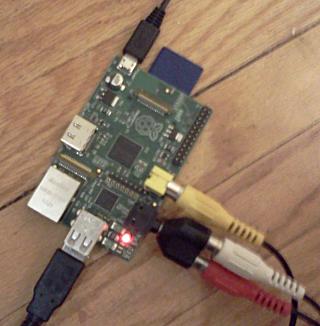
Raspberry Pi arrived!

Arrived yesterday evening: Raspberry Pi

installed the suggested wheezy, and plugged into an ancient CRT TV


Seeing the blurry fonts and typing on the old TV brings back memories of using ancient computers like the Commodore 64 ...

A few details:
Ordered from Allied Electronics, Canadian site
Power supply is from an old pre-android LG Cell phone, back says 5 V, 0.7 A
Sound Works! via the RCA adapter, seen above
Wheezy image from here

Sunday, July 8, 2012

hide gnome taskbar

https://extensions.gnome.org/local/ very useful link for an older netbook; have the plugin to hid the taskbar installed. hat extra few pixels does make a difference on 1024x600

Tuesday, June 12, 2012

Fedora 17; Hot Dog!

Quick first impressions.

installed Fedora 17 on an older 1024x600 netbook
stats:

  • Acer Aspire 1 (black with the wavy cover)
  • dual core hyper-threaded Intel atom N570
  • 1 Gig Ram
  • Intel integrated graphics Pineview GM, 1024x600
  • WiFi recognized without a problem


installed: default gnome, 32 bit version.

OS history:
Previously was running Fedora 16, installed from a live usb stick;
then ran preupgrade to 17.

Process ran without issue; did take a long time:
I'm guessing that it would be faster to just re-install OS, keeping my /home directory.

First impressions:

seems a bit quicker;
new Gnome not too different;

one annoyance/ limitation:
some dialogs do not fit on this older system with the 600 pixel screen... could not see the bottom of some of the setup dialogs.

In a region with too many wifi networks, my VPN is off the bottom (again screen limitation?)

todo:
find a "netbook" skin for gnome; that is designed for the smaller screen.

Further notes:
(this entry will be updated a few times)

Power management
working.   I can suspend and resume, and mouse, wireless, screen all recover.
on this older system, resume is in seconds;  have not measured, would say no more than 5...

two finger mouse
working with this laptop;  tried it briefly;  then turned it off;
I do like and use the "scroll on right side" but I'm not using two finger moves yet.
-I still prefer a mouse, if I have the desk space.

External screen
working.
older laptop has VGA only, fedora picked it up. Tried dual monitor support;
the screen UI picked up both, but only set external to maximum of 1024x768
could not configure for higher...

Sound?
working; is a netbook with small speakers that are not loud.


Video Camera?
this may be an issue;
Skype, and SugarOS did seem to lock on using the Camera a few times;
now seems ok;  I have updated to current levels  kernel: 3.4.0-1.fc17.i686

SugarOS
working great, only the odd lockup with video camera


Chrome XOs?


running Fedora 17 with SugarOS UI on an older netbook.

found I could run google-chrome from the Sugar terminal.

The menu and tabs are not "sugarized", so you can maximize chrome, and it seems like it has taken over the system: