Showing posts with label RaspberryPi. Show all posts

Saturday, May 26, 2018

Raspberry PI PIXEL on old laptop

Installed the raspberry PI os PIXEL on an old laptop

https://www.raspberrypi.org/blog/pixel-pc-mac/

laptop:

old acer aspire one:

  • atom N570 cpu, 4 core 1.66GHz
  • intel graphics
  • 1 G ram
  • 250 MB HD
  • 1000x600 screen
  • wifi


almost the same specs as a Raspberry PI 3!

initially works fine, except BATTERY DIES, even when lid closed!

solution:
install the laptop components of debian to manage power properly:

sudo apt install laptop-mode-tools

then run the control utility (as root)

sudo /usr/sbin/lmt-config-gui

so far working well ...


Tuesday, July 29, 2014

linux/Raspberry pi SD card compatibility

annoying fact:

Linux on my old netbook only works with some SD cards.

much to my surprise, it seems that some SD cards are not compatible.

for the longest time I assumed it was the kernel and drivers I was using, but then I switched to another brand, and it worked perfectly....

so general advice;  have a variety of different vendor SD cards available when you are trying out the linux support.

a different SD card may work perfectly, on the same setup.

(using Fedora on Acer aspire one D257)

found the same true with the raspberry pi board, could not get it to boot with some SD cards, and others work fine.


Wednesday, June 5, 2013

Minecraft Pi 0.6.1 cannot talk to the updated Android version 0.7

Oh no...

updated my android minecraft;

(looks nice)

but now can no longer connect to our raspberry pi minecraft :(

so now it is a waiting game;  I assume minecraft_pi will be updated?

so if you read this, and have not updated minecraft... you may want to wait...


Friday, May 31, 2013

Minecraft pi supports words on signs

Found, by accident, that the minecraft pi supports signs with words,  if you create the sign with an android pe client.

The default behaviour on minecraft pi is to place a blank sign.

They do survive saving and restarting.

need to dig into the python api to see how to do it there...


Sunday, May 26, 2013

pidora minecraft how to

Just downloaded pidora: http://pidora.ca/

and the first thing to check:

Does it run minecraft_pi?

Yes !  but not immediately.

found had to install 2 libraries, and then add permissions to the graphics device;

so, as root:


yum install libpng12.armv6hl SDL.armv6hl

chmod a+rw /dev/vchiq


and then you can unpack and run minecraft_pi !

Notes:
  1. the window decorations on the default window manager, do not quite work for me; so the minecraft window "floats" above the border.
  2. I know I should look at a better way of handling /dev/vchiq, but above will work
  3. the screensaver!  defaults do not understand the minecraft window works, so if you let the default locking screen saver start, you have to "type blind" as the minecraft window likely is sitting on top of the normal re-login screen.  I turned the screen saver off for now.
  4. Firewall !!  Fedora has firewall enabled; so was not visible with my android minecraft pe;  had to call up the firewall gui and enable port 4711 ...


Sunday, April 28, 2013

multi user minecraft on a pair of Raspberry PIs

Minecraft on Raspberry PI, supports multi users!

we have two original (256 meg) raspberry pi in the house, and have tried out the multi user mode.

one on the old composite TV, second on an HDMI monitor.

[screen shots pending]

notes:

  • the composite TV at ~600x400 is a slightly squished (and blurry) version, but easily playable.  runing with the minecraft window maximized.  Could switch the window manager to a simpler version : Blackbox ?
  • StevePi on the network as the user id... need to look at changing this default (both currently say the same, so need to look at the IP)
  • running on an internal network, not on the "bare" internet.

p.s.
Android + PI

Found the Demo Android version of minecraft fails to connect;  you need to connect with the full version; so then your android device can also participate.

Sunday, March 3, 2013

iPython Notebook + raspberry pi + minecraft api

using iPython notebook with the raspberry pi minecraft api for quick experiments.

using a second x86 linux machine that hosts iPython, running Fedora 18, default iPython install.


  • copy or unpack the api/python directory
  • modify the minecraft.py : change 'localhost' to the ip address of your raspberry pi
  • start notebook from api/python directory (for import commands to match samples on the web)


ipython notebook --pylab inline


then you have

import mcpi.minecraft as minecraft
import mcpi.block as block
mc = minecraft.Minecraft.create()

print mc.player.getPos()
mc.postToChat("hello from iPython")


Saturday, March 2, 2013

Raspberry Pi Minecraft python api observations

playing with the mincraft-pi and python.

the addition of the api allows you to build structures using blocks that are not usually allowed:

a few fun items I found after a few calls ...


  • lava flows down to the ground if a block of lava placed in air;  you end up with a glowing tower of lava
  • lava turns to stone if you drop lava into water, or if water is dropped onto lava
  • water flows like jello, if you try to create structures above ground of water blocks, they will flow down and ooze.
  • water flows faster than lava; you can drop lava on top of a hill, then later drop water...


[inserting screen shots here, simple shots seem problematic, using phone camera]


result of loop to place an instance of all blocks; the lava and water flow over the side
did place a solid block below, as physics will cause some blocks to fall out of the sky (SAND,GRAVEL)


some geek math ... exploring the lower section of a Mandelbrot set


Tuesday, October 9, 2012

Adafruit's WebIDE on latest Raspbian

trying out Adafruit's web ide

initial notes, quick in no particular order...

1) for me did not install via script;
there were some failed dependencies;
(my network may not be the fastest, so likely some time outs)

so the system was not installed.  reran the install script a few times, and it failed at different points.

finally just ran the partially installed startup script as if I had installed manually from git and noted which packages failed to load/install, and installed them manually via sudo npm .

2) version I installed is hardcoded for user pi;  initially tried with a different userid, and system scripts were coded for pi;
-could fix this, but for initial tests, have switched over to pi user.

3) success;
first project running "hello world" and loops!  Very cool.

4) npm is new for me:
lots of "magic" of nodejs ... I'm new to npm and node.js .  IDE does not use python, to teach python?  I was expecting something like idle (icon is on raspbian default desktop)

5) may try c for next set of tests.

6) interesting, IDE is setup for bitbucket, not github?
(I see the ide itself on github)
-could fix this in the code, but leaving with defaults for now.
(I have a github account, created a new account for bitbucket)

Wednesday, September 19, 2012

New Raspbian running

new raspbian image running. Detected wireless out of box. Found driver is loaded from "staging" area, so hope it will eventually get promoted.

trying turbo mode.

penguinspuzzle does still lock up occasionally.

One slight oddity:
wireless keyboard does not startup all the time.
unplugging wireless usb radio dongle, and plugging back in re-enables.

Tuesday, September 18, 2012

Fedora on Raspberry Pi, fedoraspberry? pi-dora?

Tried out one of the Fedora 17 images
I use Fedora on my netbook, so it was familiar

Notes:
The video settings are different than raspbian. Noticed due to running on a SD TV
Pygame was not installed by default, but a quick
 yum install 
enabled it, and could run wormy.

Wednesday, September 12, 2012

Raspbmc and MythTV, via WiFi, no extra codec

MythTV videos playing on the Raspberry Pi

notes:
MythTV setup on Fedora creates files that do not play on a default setup; but if they have been transcoded, they play.
All defaults, did not change MythTV settings.
TV card:Hauppauge WinTV-PVR-USB2 MPEG2 Encoder/Tuner

Monday, September 10, 2012

Colossal Cave on Raspberry PI

Putting some old text games on the Raspberry PI This is a very old one I played : Colossal Cave Adventure
part of the bsdgames package.

apt-get install bsdgames

Friday, September 7, 2012

US keyboard, case and WiFi on Raspberry PI

There is our 1.0 case. The chef's hat seemed to fit the theme: The SD Card is like a cookie tray, says my son.
logged into the raspbian image, using a US keyboard. Originally accepted all defaults settings, including the UK keyboard; My daughter trying to type some python scripts noticed the discrepancy...
ran the command
sudo dpkg-reconfigure keyboard-configuration
to reset keyboard.

WiFi
using the Debian instructions for command line have connected an ASUSTek Computer, Inc. USB-N10 802.11n Network Adapter [Realtek RTL8188SU] Update
The Chef is from the lego city hotdog cart
I picked the ASUS WiFi dongle, since it has "Linux Support" printed right on the packaging!

Sunday, August 26, 2012

Raspberry Pi wheezy image mounted on Fedora netbook

on fedora 7 netbook:
have mounted the wheezy image, to try out the python_games.
netbook is running Fedora 17, with pygames installed.

note
Needed to find the offset via parted
as root

parted /download/2012-08-16-wheezy-raspbian.img
then within parted
(parted) unit B
(parted) print                                                            
Model:  (file)
Disk /download/2012-08-16-wheezy-raspbian.img: 1939865600B
Sector size (logical/physical): 512B/512B
Partition Table: msdos
Disk Flags: 

Number  Start      End          Size         Type     File system  Flags
 1      4194304B   62914559B    58720256B    primary  fat16        lba
 2      62914560B  1939865599B  1876951040B  primary  ext4


then mount using offset above

mount -o loop,ro,offset=62914560 /download/2012-08-16-wheezy-raspbian.img  /mnt

Then we can see the files under /mnt

Friday, August 24, 2012

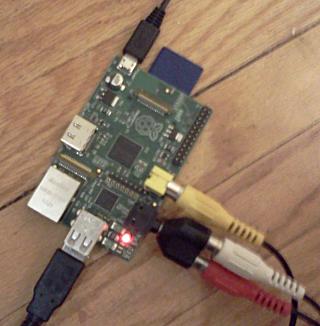
Raspberry Pi arrived!

Arrived yesterday evening: Raspberry Pi

installed the suggested wheezy, and plugged into an ancient CRT TV


Seeing the blurry fonts and typing on the old TV brings back memories of using ancient computers like the Commodore 64 ...

A few details:
Ordered from Allied Electronics, Canadian site
Power supply is from an old pre-android LG Cell phone, back says 5 V, 0.7 A
Sound Works! via the RCA adapter, seen above
Wheezy image from here