Tuesday, September 18, 2012

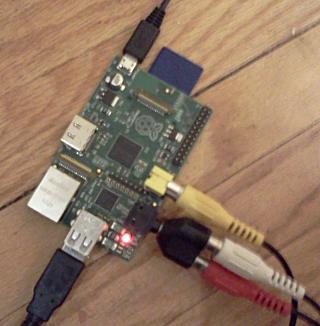
Fedora on Raspberry Pi, fedoraspberry? pi-dora?

Tried out one of the Fedora 17 images
I use Fedora on my netbook, so it was familiar

Notes:
The video settings are different than raspbian. Noticed due to running on a SD TV
Pygame was not installed by default, but a quick
 yum install 
enabled it, and could run wormy.

Thursday, September 13, 2012

Fedora 17 + acer aspire one SD Card reader fix

my netbook : Acer Aspire One D257-1814

did not recognize the SD card reader with the default Fedora 17 build. Googled and found that a missing "staging" module was required:
having previously installed rpmfusion:

yum install kmod-staging
modprobe keucr

(did reboot)

now inserting my SD card brings up the file dialog!

necessary to rebuild raspberry pi images.

Update: 2014
Fedora 20 "just works"
out of box.
no new mods required.

Wednesday, September 12, 2012

Raspbmc and MythTV, via WiFi, no extra codec

MythTV videos playing on the Raspberry Pi

notes:
MythTV setup on Fedora creates files that do not play on a default setup; but if they have been transcoded, they play.
All defaults, did not change MythTV settings.
TV card:Hauppauge WinTV-PVR-USB2 MPEG2 Encoder/Tuner

Monday, September 10, 2012

Colossal Cave on Raspberry PI

Putting some old text games on the Raspberry PI This is a very old one I played : Colossal Cave Adventure
part of the bsdgames package.

apt-get install bsdgames

Friday, September 7, 2012

US keyboard, case and WiFi on Raspberry PI

There is our 1.0 case. The chef's hat seemed to fit the theme: The SD Card is like a cookie tray, says my son.
logged into the raspbian image, using a US keyboard. Originally accepted all defaults settings, including the UK keyboard; My daughter trying to type some python scripts noticed the discrepancy...
ran the command
sudo dpkg-reconfigure keyboard-configuration
to reset keyboard.

WiFi
using the Debian instructions for command line have connected an ASUSTek Computer, Inc. USB-N10 802.11n Network Adapter [Realtek RTL8188SU] Update
The Chef is from the lego city hotdog cart
I picked the ASUS WiFi dongle, since it has "Linux Support" printed right on the packaging!

Sunday, August 26, 2012

Raspberry Pi wheezy image mounted on Fedora netbook

on fedora 7 netbook:
have mounted the wheezy image, to try out the python_games.
netbook is running Fedora 17, with pygames installed.

note
Needed to find the offset via parted
as root

parted /download/2012-08-16-wheezy-raspbian.img
then within parted
(parted) unit B
(parted) print                                                            
Model:  (file)
Disk /download/2012-08-16-wheezy-raspbian.img: 1939865600B
Sector size (logical/physical): 512B/512B
Partition Table: msdos
Disk Flags: 

Number  Start      End          Size         Type     File system  Flags
 1      4194304B   62914559B    58720256B    primary  fat16        lba
 2      62914560B  1939865599B  1876951040B  primary  ext4


then mount using offset above

mount -o loop,ro,offset=62914560 /download/2012-08-16-wheezy-raspbian.img  /mnt

Then we can see the files under /mnt

Friday, August 24, 2012

Raspberry Pi arrived!

Arrived yesterday evening: Raspberry Pi

installed the suggested wheezy, and plugged into an ancient CRT TV


Seeing the blurry fonts and typing on the old TV brings back memories of using ancient computers like the Commodore 64 ...

A few details:
Ordered from Allied Electronics, Canadian site
Power supply is from an old pre-android LG Cell phone, back says 5 V, 0.7 A
Sound Works! via the RCA adapter, seen above
Wheezy image from here